
Looking to gear up your characters without all the grind? Since 2015, the SWGOH Webstore has become a vital tool for players building their own teams from the Star Wars Universe to battle in turn-based hologames, epic raids, and 5-on-5 squad fights.
SWGOH has a wide range of exciting ways to play, and utilizing the SWGOH Webstore is the key to playing how you want, when you want. Much like the in-game store, the webstore lets players take advantage of bonuses, discounts, and daily free rewards on top of the items they purchase.
Designed to streamline your levelling and gearing up process, you can use the webstore to skip in-game timers, get your team battle-ready faster, or even access characters earlier by avoiding the in-game grind. All the items you need in-game for unlocking new characters for your squad, or gearing them up, you’ll find on the webstore, sometimes at over 30% discount from in-game.
We’re going to walk you through getting the most out of the site, and what you should be keeping an eye out for to maximize the benefits!
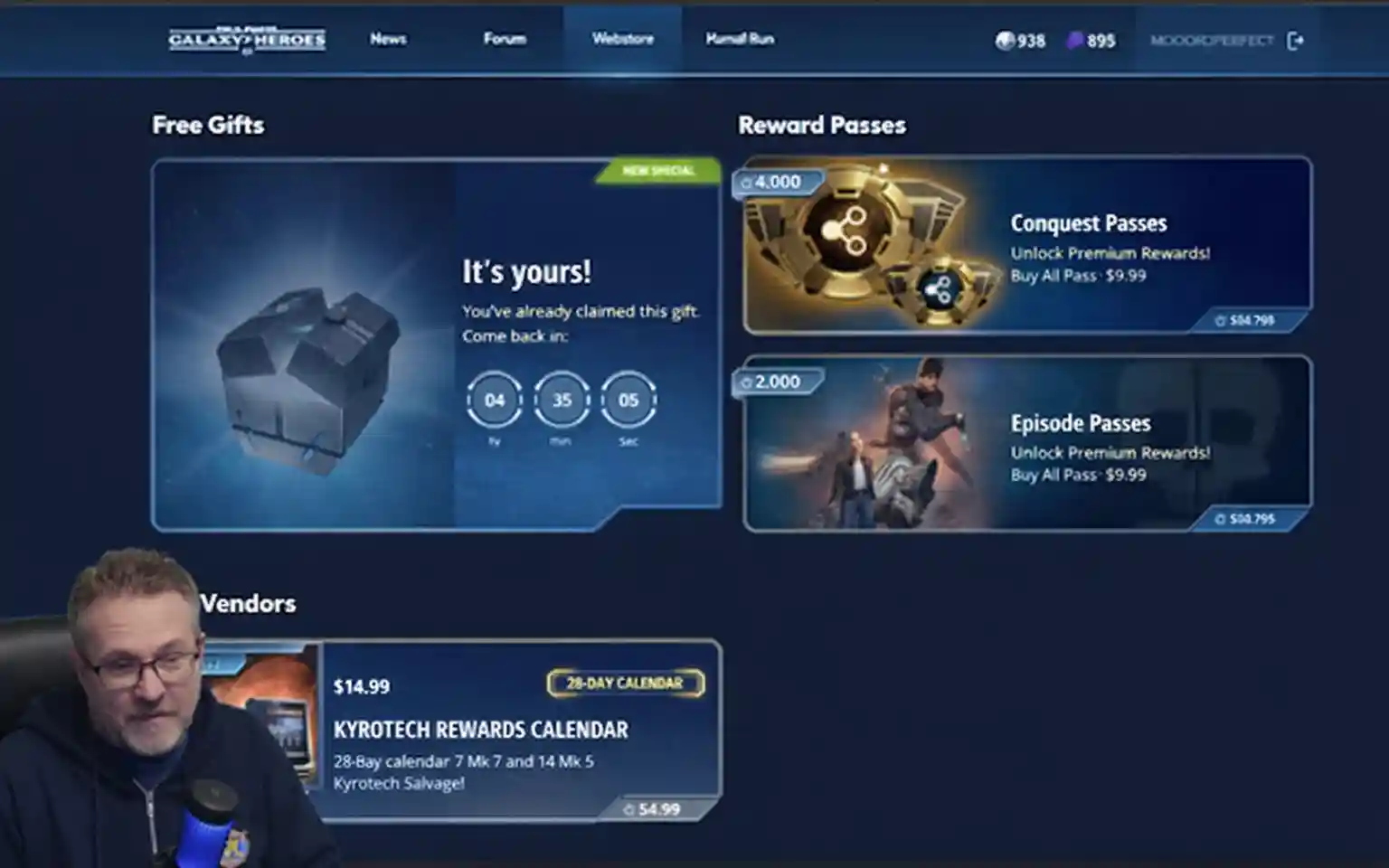
What Is The SWGOH Webstore?
Basically, the SWGOH webstore is just an outside version of the shipments you see in the app. It’s where you go to grab extra gear or shards using your crystals or real cash. The big difference? It’s usually packed with “web-only” bonuses and freebies that the developers don’t put in the actual game client.
To be honest, the only reason most of us even use the SWGOH webstore is for the extra loot. If you’re trying to build a solid roster without spending a fortune, you’re kind of shooting yourself in the foot if you don’t check the web version first. It’s just more bang for your buck.
If you’re totally new, Galaxy of Heroes is a massive Star Wars character collector. You spend your time building teams to climb the Arena ranks or helping your guild out in raids. It’s been around since 2015, so there’s a ton of content to catch up on, which is where the store comes in.
Let’s face it—the gear grind in this game is brutal. You can farm missions for months, or you can use the store to speed things up. If you want to stay competitive and actually win your GAC matchups, you’ll need the high-end gear. The webstore is basically a shortcut to skip the boring stuff and get your squad battle-ready.
Why Is The SWGOH Webstore Important?
There are many benefits to using the store, from saving time grinding content by using your wallet to save yourself time, or accessing daily promotions, loyalty, and login rewards.
The SWGOH economy can be confusing for new players, as there are many ways to purchase the gear you need. There are Crystals, Credits, and a dozen different Tokens all used to help you boost your squad.
By using the SWGOH Webstore, you can simplify this system by purchasing the exact items or currencies you need. Unlock new characters with character bundles, purchase gear with discounted Crystals, or stock up credits with extra bonus loot. The webstore lets you keep up with the flow of battle without having to grind for currencies you need.
While SWGOH is a free-to-play game, you can get ahead of the rest by using the webstore. The store lets you buy gear either with your in game currencies or with real money, so you won’t have to wait to get that upgrade you need.
Deals often come and go, so if you miss out you may not see that special offer again! But don’t spend above your limit even if you see some bundles that look appealing.
The SWGOH Webstore is a tool first and foremost, and is there for players to maximize their gameplay, but isn’t a requirement for players to succeed!
Who Should NOT Use the SWGOH Webstore (And Why)
If you’re a pure F2P player or still under level 60, the webstore can actually slow your progression. Buying early gear bundles often wastes Crystals that are better spent on energy refreshes.
How To Access The SWGOH Webstore
Accessing the webstore is simple, it just requires a couple of quick and easy steps to get set up – if you have a PC available, this will make it a little faster for you. You’ll need to make an EA Account or find your login if you already have one, so this step can be done in advance if you want to get it done before you need to jump in game to link them.
Step 1:
Launch the game, select the gear icon on the Cantina screen and open Settings
Step 2:
Select Connect and then EA connect to link to your EA account
Step 3:
Visit the SWGOH Webstore and select Log In
Step 4:
Enter the details of your EA Account – not your SWGOH login – then select Send Code.
Step 5:
Confirm the verification code and you’re in!
So, your account is linked to EA’s SWGOH Webstore, but that doesn’t mean you can’t use the in-game store still – the Webstore is just a bigger and better version, with even more bonuses available!
Troubleshooting: How to Fix the SWGOH Webstore Login Loop
Even if you follow the steps perfectly, the SWGOH Webstore can be a bit of a nightmare to get into sometimes. If you’re staring at a “Retry” button that does absolutely nothing or you’re stuck in an infinite login loop, don’t panic—it happens to almost everyone.
Here’s how to actually get past the “EA link” headaches:
- Try an Incognito Window: This is the “magic fix.” Most of the time, the store gets hung up on old session data. Opening it in a Private/Incognito tab usually bypasses the glitch and lets you log in immediately.
- Dump Your Cache: If the site just won’t load your profile, your browser is probably holding onto some bad data. Clear your cookies and cache, restart the browser, and try again. It’s a pain, but it usually resets the connection.
- Double-Check the EA Email: This is a big one. Make sure you’re checking the inbox for the email actually tied to your EA Account. It’s often different from your Google Play or Game Center login, and that’s where people lose their verification codes.
- Watch Out for the PC Client: If you’re running the new SWGOH PC Client, try closing the game entirely before you link your account. Sometimes having the game open on your desktop while trying to link on a browser causes a “Double Login” conflict that kicks you out.
You’ve Accessed The Store, Now What
Once you’ve linked your EA account to your SWGOH account, you can use the webstore to start earning loot. That means you’ll want to get in the habit of collecting your daily login reward!
Now you can access the range of items that are available, from crystals and data packs, to resources and exclusive bundles – even character bundles.
You can shop using your in-game Crystals or Ally Points, or you can add real-world cash to your account with a range of payment options.
If you buy something in the store with real money, you’ll get it delivered to your in-game Inbox, where you can claim the items you’ve bought! Anything bought with in-game currencies will be automatically added to your account with no other actions required, just log in and enjoy your new purchases!
Please note that child accounts (accounts belonging to users under the age requirements, and with parental controls enabled) will not be able to access the SWGOH Webstore.
Gearing Up In Game vs On The Store
There are many ways to get up your characters in game, but if you want to avoid the grind and access exclusive bonuses, the SWGOH Webstore is your best option.
You can use your in-game currencies (Crystals or Ally Points) on the webstore, or you can use cash to speed through the leveling and get a more powerful squad in no time.
Purchase Shard Store Tokens to access new characters, or level up your characters for more intense battles, and upgrade your squad with new gear you can buy with credits or Crystals.
The Webstore lets you bypass in-game timers with Crystals, so make sure you choose where to spend your cash wisely!
With so many options available, such as Crystals, gear packs, resource packs, and data cards, one of your best options is to keep an eye out for exclusive bundles!
Don’t forget to claim your daily rewards simply by logging into the store every day, with handy bonuses of Crystals, gear, and resources available for free!
SWGOH Exclusive Bundles
The Webstore constantly has exclusive deals available, with items bundled together for massive bonuses compared to the in-game store, and saving you a lot of time grinding for the same gear. These bundles typically group together characters, gear, and crystals, so that you can get a boost and jump your progress ahead quickly and easily.
Bundles don’t guarantee certain characters will be unlocked on your account, so make sure you check the description of the bundle first in case you won’t gain the progress you expected, but purchasing character bundles is a great option to speed up the process of unlocking the rarest characters.
The exclusive bundles let you spend less and gain more compared to the in-game store, with some bundles offering over 30% increased Crystals compared to in-game – so it’s worth checking the Webstore before you make any purchases!
The Webstore also makes it easy to sort through gear so you can find legendary characters to unlock, or high-end gear for your squad to step up their battle status.
Exclusive Offers And Deals On The SWGOH Webstore
It isn’t just the bundles that make the webstore worth your time; it’s the exclusive offers that you can get when making even small purchases. The webstore lets you maximize value with whatever you need to buy, from gear packs to crystals.
You can never have enough crystals, so the SWGOH Webstore makes it easy for you to stay well-stocked with discounted crystals, letting you build your squad up using Anniversary Lightspeed Tokens. Once you have a roster of characters that you’re happy with, make sure they’re geared up efficiently with the store’s gear packs, saving you hours of grinding and letting you massively increase your characters’ effectiveness in battle.
The bundles and exclusive offers rotate regularly, so make sure you’re keeping an eye on the store. Logging in to collect your free daily rewards is the best time to do this! While some offers may seem too good to miss, make sure you know how much you’re willing to spend and keep to your budget.
Maximizing Value With The SWGOH Webstore
The SWGOH Webstore helps you grow powerful quickly. Smart shopping choices make the difference. Character shard packs speed up your progress. They help you unlock and upgrade units. Raising a character to 7 stars costs 1,000,000 credits. You can skip this cost using store shards.
Log in every day for free rewards. This is the best way to maximize value. Check the site for crystal deals and bundles. Limited-time offers are great for boosting your account. They help you reach your goals faster.
Synchronize your webstore login with your daily reset. This simple step saves time. You can claim webstore rewards and daily payouts together.
Step 1:
In game, select the gear icon on the Cantina screen for Settings.
Step 2:
Select the Time Settings option, and under New Time dropdown the Daily Activities Reset option.
Step 3:
Choose a new time on the Select New Time screen, then Confirm, and Confirm on the next page too.
Step 4:
A Change Time Settings pop-up will come through, so pick Confirm and then Restart.
This will make sure you get all of your loot in one hit, letting you make more informed purchases as you can see how much currency you’re working with!
The SWGOH Webstore is a fantastic tool for players to get more out of their time, not just letting you speed up grinding by boosting your account with character bundles, gear, or Crystals, but also collecting some handy free rewards simply by logging in each day! Now is the best time to get playing, so link your EA account to the store and put together the squad you’ve dreamed about!
Frequently Asked Questions:
It’s pretty straightforward once you’ve linked things up. Go into your in-game Settings, hit ‘Connect,’ and link your EA Account. After that, just head to the webstore site and log in with those same EA details.
Usually, yeah. You’re looking at around 5% to 30% more value on Crystals and gear compared to buying directly in the app. Plus, you get that free daily reward chest just for showing up.
If you’re playing on a “child account” or have strict parental controls turned on, EA blocks the webstore access entirely. You also need to be at least 18 to use the real-money side of the shop.
This is a rare processing error where the system sends 2,800 Crystals as “compensation” instead of the characters. Do not spend the crystals. Take a screenshot of your receipt and contact EA Support to have your intended bundle manually added to your account.
Yes. Purchases sync across all platforms. Always close the PC Client before using the webstore. This prevents “Login Loop” or “Double Session” errors during your purchase.
Lightspeed Bundles (LSB) are direct purchases that promote a specific group of characters to high Relic levels. Lightspeed Tokens (LST) are a newer currency used to pick a single specific character to boost. Both are often webstore exclusives.