Verified Working: Manually checked and confirmed working on the latest Free Fire OB45 Update (July 2026).
⚡ Quick Copy Space Symbols
🎮 Live Free Fire Name Creator
Type your name below using the normal spacebar. We will automatically convert your spaces into Free Fire invisible text!
NINJAㅤPRO
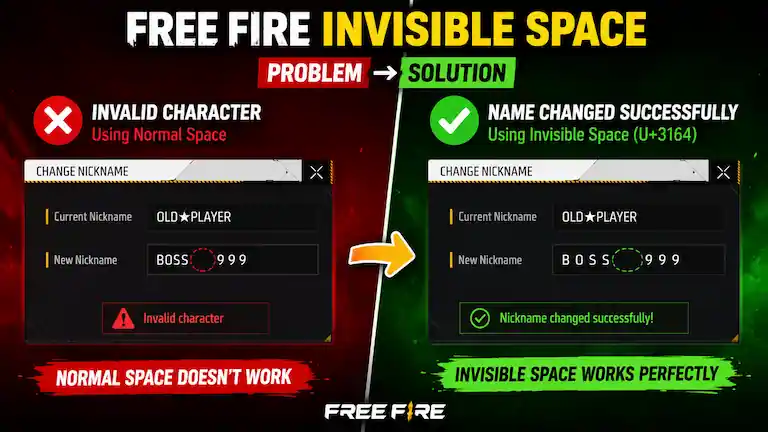
Do you want a blank space in your Free Fire name, but the game says no? Many players have this same problem.
If you use the normal spacebar on your phone keyboard, the game gives you an “Invalid character” error.
The game blocks normal spaces to stop glitches. But do not worry, the fix is very easy: you just need a Free Fire Invisible Space.
Use our copy-and-paste tool above. It gives you a hidden text symbol that the game actually allows. You can use it to make a totally blank name, or to put a gap between your clan tag and your name.
What is a Free Fire Invisible Space?
An invisible space is a special text symbol. It looks completely empty to your eyes, but the game reads it as a real letter.
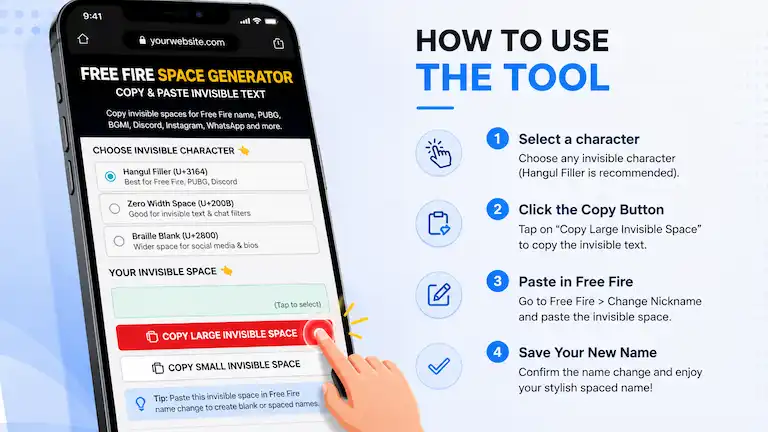
Our tool gives you a few choices. Here is what they do:
Name
Code
Best Used For
Hangul Filler
U+3164
Free Fire, PUBG, and Discord names. (Best choice!)
Zero Width Space
U+200B
A completely hidden dot.
Braille Blank
U+2800
A wider space. Good for blank WhatsApp messages.
How to Change Your Name in Free Fire with a Blank Space
Follow these easy steps to change your name:
Copy the Hangul Filler space from our tool above.
Open Free Fire or Free Fire MAX (this trick works perfectly on both games).
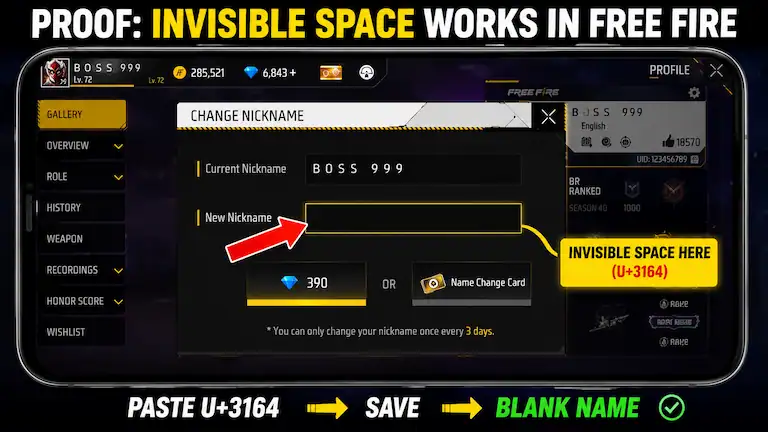
Go to your Profile and tap the yellow pencil icon next to your current name.
Type your new name. Paste the invisible space wherever you want a gap.
Tap confirm. It will cost 390 Diamonds or one Name Change Card.
Video Tutorial
If you prefer a visual guide, watch this quick video to see exactly how to paste the invisible space into your game:
Does this work on all devices?
Yes, but pasting the space works differently depending on your device:
Android Phones: Press and hold your finger in the name box until “Paste” shows up.
iPhones (iOS): Tap the name box once, wait a second, and tap “Paste”.
PC Players (BlueStacks / Emulator): You cannot right-click to paste. You must click the name box and press CTRL + V on your computer keyboard.
Important Note on Size: Free Fire names can only be 12 characters long. The invisible space counts as 1 character, so count your letters carefully!
Top 50 Free Fire Stylish Names (Ready to Copy)
Don’t want to make your own name? Here are some trending stylish names with the invisible space already added. Just copy the one you like and paste it directly into the game!
B O S S ㅤ 9 9 9
V I P ㅤ L E G E N D
R O M E O ㅤ 0 0 7
K I N G ㅤ 👑
D A R K ㅤ S O U L
P R O ㅤ B O Y
G O D ㅤ Z I L L A
S K ㅤ S A B I R
R A I S T A R ㅤ 9 9
B L A C K ㅤ 4 4 4
L E G E N D ㅤ X
D E M O N ㅤ ☠️
J O K E R ㅤ 🃏
W H I T E ㅤ 4 4 4
G O K U ㅤ ⚡
N I N J A ㅤ ⚔️
O P ㅤ B I N D A S S
C R I M I N A L ㅤ 0 7
B O T ㅤ K I L L E R
D E A D ㅤ S H O T
T O X I C ㅤ B O Y
M A F I A ㅤ 👑
S N I P E R ㅤ F F
B A D ㅤ B O Y
R O U K ㅤ F F
G Y A N ㅤ G A M I N G
A J J U ㅤ B H A I
V I N C E N Z O ㅤ ⚡
N O O B ㅤ P L A Y E R
I N D I A N ㅤ F F
G O D ㅤ F A T H E R
S H A D O W ㅤ 9 9
K I L L ㅤ C H O R
H E A D ㅤ S H O T
D A N G E R ㅤ ⚠️
A L O K ㅤ F A N
P S Y C H O ㅤ 😈
L O V E R ㅤ B O Y
F I R E ㅤ E X E
M O N S T E R ㅤ 👹
R O Y A L ㅤ P A S S
S O U L ㅤ F F
G A M I N G ㅤ P R O
C O B R A ㅤ 🐍
W O L F ㅤ 🐺
S U K U N A ㅤ ⛩️
I T A C H I ㅤ 👁️
T R I P L E ㅤ 9 9 9
G H O S T ㅤ 👻
V ㅤ B A D G E ㅤ 💎
Frequently Asked Questions (FAQ)
Does the invisible space work in Free Fire MAX?
Yes. The U+3164 space works exactly the same in both regular Free Fire and Free Fire MAX.
Will my Free Fire account get banned for using this?
No. Using a standard Unicode text symbol is safe. Millions of players use it, and it will not get your account banned.
Why am I still getting an "Invalid Character" error?
Make sure you copied the correct symbol. Always use the Hangul Filler (U+3164). If Free Fire ever updates the game to block this symbol, we will update our tool with a new working code immediately.
Does the blank space count towards my 12-letter limit?
Yes. Even though you cannot see it, the game counts the invisible space as one letter.